My NJOI app
My NJOI app is for NJOI customers to top up, purchase channels/packs/movies, discover new promotions and the latest shows. Customers can also track the expiration date of their account credits and purchases. The app can be downloaded from the Google Play Store, Apple App Store and Huawei App Galley for free.
The app is only for NJOI customers with a HD-enabled box. Check if your box is a HD-enabled box using this guideline.
To enjoy the features on the My NJOI app, you can choose to upgrade your decoder to a HD-enabled box.
Yes, customers can purchase Astro First movies through the My NJOI app.
No, the app is for customers to purchase channels, packs and movies.
Your credit card is authenticated in a secure payment environment through the Astro Payment Portal. Do provide the necessary details to proceed with your purchases ie. Bank Login details, Credit Card number, CVV and OTP.
Your purchases will be displayed in the 'My Purchases' tab in the app.
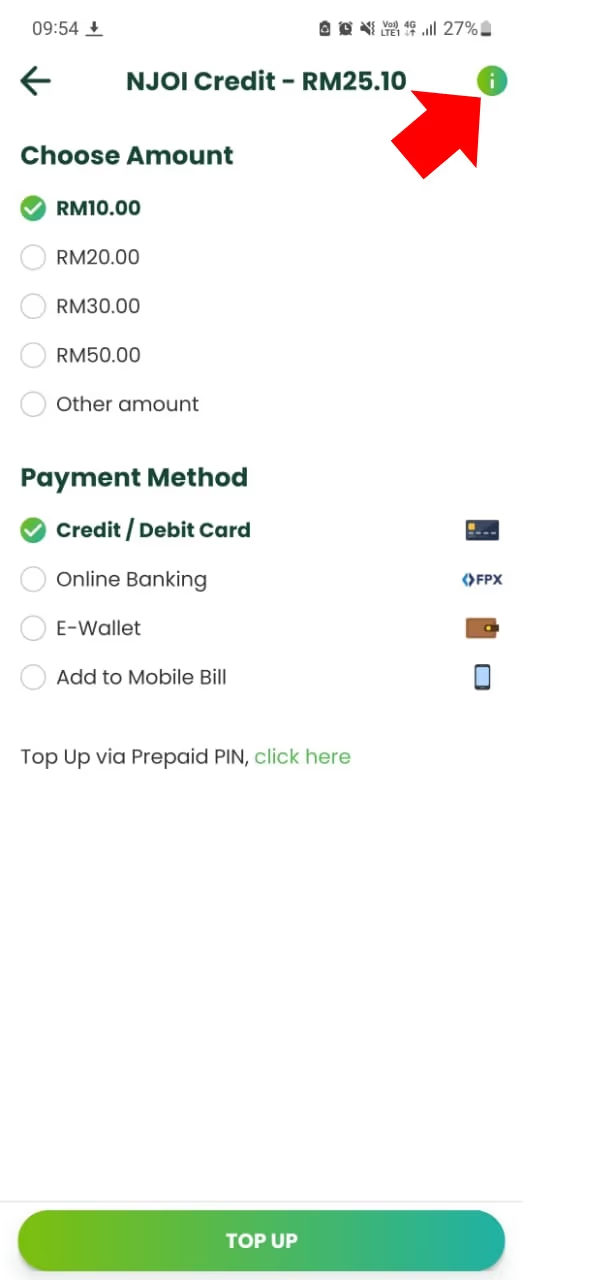
You can top up your account from RM 1 to RM 250 to make a purchase or purchase directly via Online Banking or using your credit/debit card.
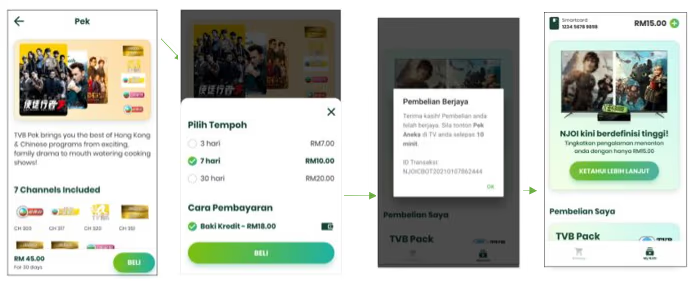
Purchases with Credit Balance Flow (Packs and Movies)
- The user can select the pack/movie to be purchased and press "Buy"
- The user can view and select the duration of the pack/movie and continue buying using the credit balance.
- After purchase, the user will receive a notification status that appears notifying the purchase was successful and the user will be taken back to the My NJOI tab. Users will see their purchases.
- If the user does not have enough balance, the system will appear with a message informing the user to make a top -up and then make a purchase as soon as the top -up is successful.
Users only need to enter their smartcard number, which can be found on NJOI CH200.
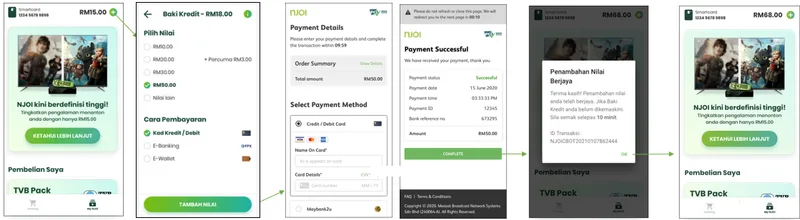
You can top up your account on the My NJOI app with your credit card, debit card and/or from your savings and current account opened with a bank incorporated in Malaysia via FPX (Financial Process Exchange).
To start, users can navigate to the Catalogue tab and proceed to top up by clicking on the "+" icon.
It will show purchases from the last 60 days.
It will take around 10 to 15 minutes.
For now, you can store up to RM250 in the My NJOI app.
The daily spending limit is RM 250. We would suggest checking if your purchased channel/pack/movie is granted before making more purchases.
Yes, your personal data is protected by the Personal Data Protection Act.
It will take approximately 10 to 15 minutes for it to reflect accordingly.
Should you have a positive credit balance in your NJOI account, the balance will expire accordingly if left unused.
According to our terms and conditions, the balance of credits in your My NJOI app is not refundable.
Customers can unlink their smartcard from the app by navigating to Settings, click on "smartcard" and proceed to change the smartcard number to remove your account.
iOS version - minimum is iOS 11, maximum is 15
Android version - minimum Android 5, maximum is 12
No, there is no auto-renew feature on the website but it's available on the My NJOI app, and only made available when there is credit balance in the customer account
Customer able to save card details for future purchases on My NJOI app
In the event this happens, do reach out to us immediately at [email protected].
Please take note that it is your responsibility to examine the record of your transactions conducted through My NJOI app regularly and to notify us forthwith any errors, irregularities, discrepancies or unauthorized transactions.
The My NJOI app can be downloaded for free from the Google Play Store, Apple App Store or Huawei App Galley. Standard internet usage and charges apply for the user to download and use the app.
My NJOI app is currently available in Bahasa Melayu and English.
There is a notification for credit expiry. Users can also view their credit balance expiry date on the "top up" screen and they can click on the "i" icon for more details.